
Use conda-workspaces#
This is the optional conda-workspaces integration. If you only need a regular
conda environment, create a named environment from environment.yml instead.
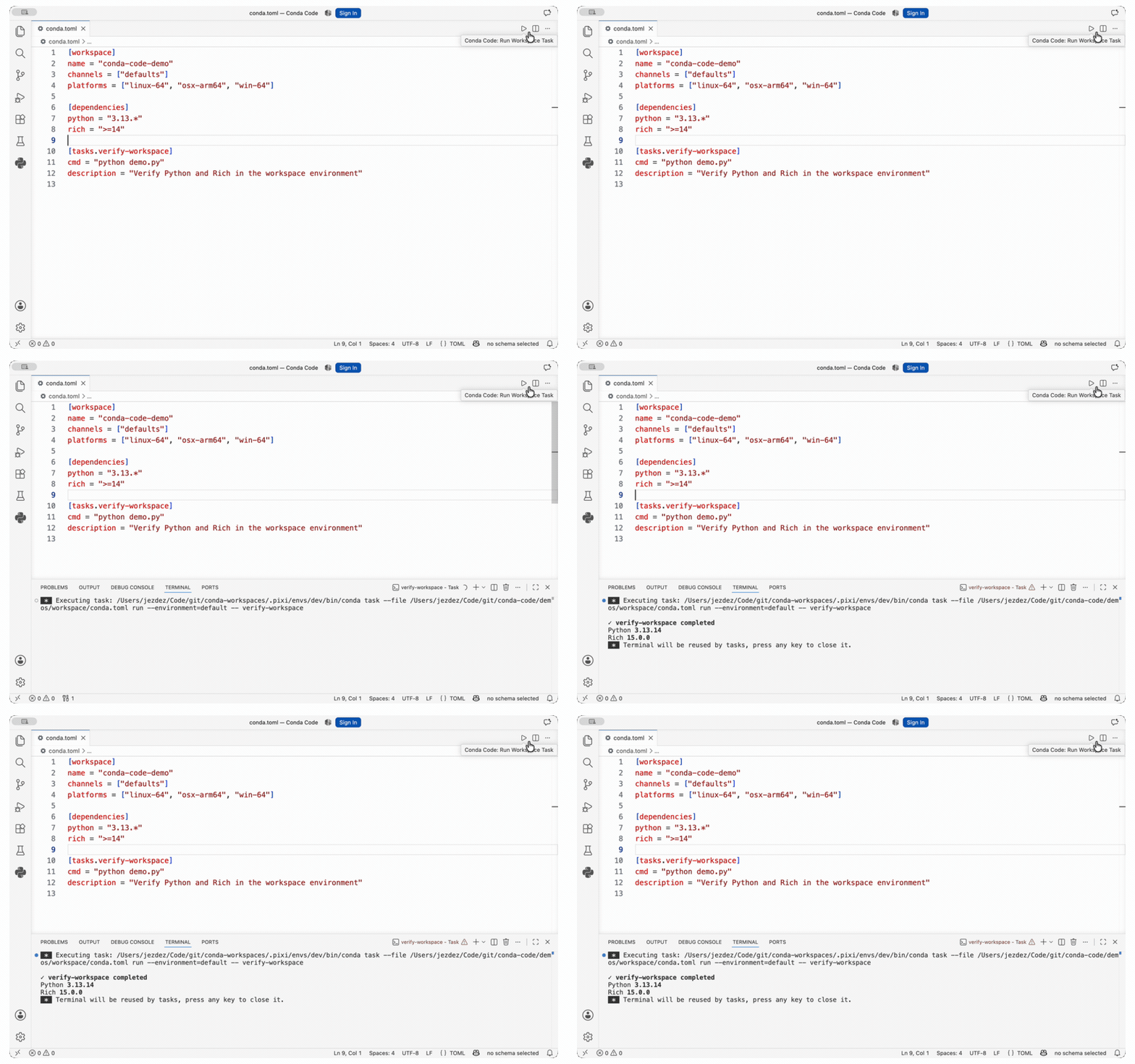
Conda Code discovers the task through conda-workspaces. Its editor action opens the task picker, then VS Code runs the selected task in a terminal.
Know which part does what#
Four components contribute to the workspace experience:
Owns the shared Python Projects and Environment Managers views. Register the workspace folder here as a Python project, then select environments from the shared tree.
Adds the Conda Code branch, supplies environment and package records, routes workspace operations, and contributes Run Workspace Task.
Owns the manifest, declared environments, installed workspace state, dependency changes, task graph, and task execution.
Shows the task picker, starts the process, and owns the task terminal. Conda
Code hands it the selected conda task invocation.
Register the workspace#
Open the Python Environments project creator flow and choose Find workspaces. Select one or more unregistered candidates. The finder runs only when invoked.
Supported candidate names are:
conda.tomlpixi.tomlpyproject.toml
Conda Code validates each selected manifest with structured conda workspace info output and registers only valid manifest directories as Python projects.
A matching filename alone is not enough.
Run a declared task#
Save the task in the manifest. Select the Conda Code workspace environment that
should run it, open the manifest, then select the Run Workspace
Task action in the editor title. Choose the declared task. The demo selects
verify-workspace.
You can also run Conda Code: Run Workspace Task from the Command Palette.
The generic Tasks: Run Task command remains available for all discovered
conda-workspace tasks.
Conda Code asks conda-workspaces to list the tasks from the selected manifest
and delegates the selected task to conda task. When the selected environment
belongs to that manifest, Conda Code passes its workspace environment name.
Otherwise conda-workspaces applies the task’s declared environment or the
workspace default.
Conda Code does not parse or edit task definitions. This integration does not
add task arguments. Put fixed options in the task definition or use
conda task directly when arguments are required.
See the conda-workspaces task documentation for task definition syntax.
Install a declared environment#
Run Python Envs: Create Environment for the project. If the workspace has one uninstalled environment, Conda Code installs it. If it has several, select one from the prompt.
Quick Create also adds Python when the declaration needs it. See Environment operations for how additional packages are targeted with different conda-workspaces capabilities.
To require the existing lockfile, run Conda Code: Install Workspace
Environment from Lockfile and select a declaration. Conda Code calls
conda workspace install --locked directly. A missing or stale lockfile stops
the installation without solving or adding Quick Create packages.
Check or update the lockfile#
Run Conda Code: Show Workspace Lockfile Status to see whether the selected workspace lockfile is current, stale, or missing. The status applies to the whole workspace and includes the reason reported by conda-workspaces. It is available even when no workspace environment is installed.
Run Conda Code: Update Workspace Lockfile to solve every declared environment and write the workspace lockfile. These lock actions require conda-workspaces 0.10 or newer. Use 0.11.1 or newer when locking multiple platforms to avoid incorrect package records after an environment is installed. See the version requirements.
Export an SBOM from the lockfile#
Run Conda Code: Export Workspace Lockfile SBOM and choose the workspace,
declared environment, declared platform, timestamp mode, and JSON destination.
The environment does not need to be installed. Conda Code passes the declared
platform name to conda workspace sbom, including when two names use the same
conda subdir.
The export reads the existing conda.lock. It does not solve, update the
lockfile, install an environment, or download packages. Reproducible output
omits the SBOM timestamp. This action requires conda-workspaces 0.9 or newer and
conda-sboms 0.3.0 or newer in the configured conda installation.
Use Conda Code: Export Environment SBOM when you want to export the selected installed prefix instead.
Preview or build a workspace image#
Run Conda Code: Preview Workspace Image to choose a declared environment,
one of its linux-64 or linux-aarch64 platform resolutions, an image tag,
and a default command. Enter the command executable separately and provide its
arguments as a JSON string array. This keeps empty arguments and whitespace in
individual arguments intact. The preview opens the generated Containerfile and
included workspace file list as text documents. It uses --dry-run --json and
does not require Docker.
Run Conda Code: Build Workspace Image with the same selections, then choose whether to load the image into the local Docker image store or export an OCI archive. The build runs as a VS Code Task so its output remains visible and the operation can be cancelled. Builds require Docker with Buildx and a running daemon. Conda Code does not publish images to a registry.
conda-workspaces validates the existing lockfile, activation settings, dependencies, selected files, and output destination. The action never updates the workspace manifest or lockfile. Python path, Git, and URL dependencies are not supported by conda-workspaces 0.10 image builds.
Create, import, or remove a declaration#
Run Conda Code: Create Workspace Environment to add a named declaration to an existing workspace. Keep the default feature selected, add any named features that the environment should compose, or clear the default feature for an isolated declaration. conda-workspaces updates the manifest and lockfile and installs the environment. Conda Code then refreshes the project and selects the new environment.
Run Conda Code: Import environment.yml into Workspace to choose an
environment.yml or environment.yaml, name the new declaration, and let
conda-workspaces import, lock, and install it in the selected workspace.
Run Conda Code: Remove Workspace Environment Declaration to choose a declaration and confirm its removal. This removes the declaration, its lock records, and its installed prefix. Use Delete Environment when you only want to clean the installed prefix and keep the declaration.
These declaration actions require conda-workspaces 0.9 or newer. Conda Code refreshes and checks the selected workspace again before changing it, then refreshes the affected project after the command finishes.
Manage dependencies#
Use Manage Packages to add a conda dependency. Conda Code records it through
conda workspace add in the selected environment and updates the installed
environment.
When conda-workspaces reports declaration locations, you can also remove a direct dependency or update a direct conda dependency. Adding an existing direct conda dependency updates its original declaration rather than creating an environment-local duplicate. Conda Code asks before changing a top-level default or feature declaration, including a platform-qualified declaration in either shared scope.
Transitive dependencies, PyPI updates, and PyPI packages whose installed name does not match their declaration remain read-only. If an operation is refused, edit the manifest, apply the workspace change, then run Conda Code: Refresh Environments. The Package operations lists the exact capabilities and limits.
Clean an installed environment#
Use Delete Environment. Conda Code runs conda workspace clean for the
declared environment. It does not remove the declaration from the manifest.