
Discover, solve and maintain a workspace#

Build a small workspace lock, extract one saved target, generate an SBOM and update one dependency. The examples use zlib and zstd from conda-forge. Presto resolves their metadata and writes output files. It does not install the resolved packages or execute workspace tasks.
Start from the source checkout#
This tutorial uses workspace features from the unreleased source stack. Run it from a source checkout containing the shared demos/workspace/conda.toml fixture, rather than a released PyPI installation. Install the repository’s locked demo environment and enter its shell:
pixi install --locked -e demos
pixi shell -e demos
The environment installs this checkout as editable source and includes conda, the solver, workspace, lockfile and SBOM providers, plus jq. The examples need access to conda-forge repodata. Package versions can change as the channel changes, so the checks compare identities and behavior rather than a fixed list of version numbers.
Create a working directory and copy the shared fixture before leaving the repository:
demo_dir=$(mktemp -d)
cp demos/workspace/conda.toml "$demo_dir/conda.toml"
cd "$demo_dir"
The fixture declares two environments and two logical targets:
[workspace]
name = "presto-demo"
channels = ["conda-forge"]
channel-priority = "strict"
platforms = [
    { name = "cpu", platform = "linux-64", libc = "2.28" },
    { name = "gpu", platform = "linux-64", libc = "2.28", cuda = "12" },
]

[dependencies]
zlib = ">=1.3,<2"

[feature.tools.dependencies]
zstd = ">=1.5,<2"

[environments]
default = []
tools = ["tools"]
Both cpu and gpu contain linux-64 packages. Their names identify different declared system requirements. Both use glibc 2.28, while gpu also declares CUDA 12. This small example does not require a CUDA package or GPU hardware. The tools environment adds zstd to the shared zlib requirement.
Discover and select requirements#
Parse the manifest before choosing a target:
conda presto --parse -f conda.toml > discovery.json
jq '{environments, selected}' discovery.json
The result lists default and tools, each with cpu and gpu. Its selected array is empty. Discovery does not choose the platform of the machine running Presto.
Select the tools environment and the logical gpu target:
conda presto --parse -f conda.toml -e tools -p gpu > selected.json
jq '.selected[] | {environment, platform, subdir, specs, system_requirements}' selected.json
Expect environment: "tools", platform: "gpu" and subdir: "linux-64", with both package requirements and the declared glibc and CUDA versions. Use cpu or gpu when selecting this workspace. linux-64 is ambiguous because it identifies both targets.
Solve the complete matrix#
Omit selectors to solve both environments across both logical targets:
conda presto -f conda.toml --format conda-workspaces-lock-v1 > conda.lock
conda presto --parse -f conda.lock > saved.json
jq '.environments' saved.json
The lock contains four environment/target selections. Its package records include exact URLs and hashes. Shared selections can reference the same records, and cpu and gpu remain distinct even if this example selects identical packages for both.
Keep the input filename conda.lock when passing a workspace lock to Presto so its parser recognizes the format. Solving fetches channel metadata. It does not download or install package archives.
Extract and describe one saved target#
Extract only tools/cpu into another workspace lock:
mkdir extracted
conda presto --export -f conda.lock -e tools -p cpu \
  --format conda-workspaces-lock-v1 > extracted/conda.lock
conda presto --parse -f extracted/conda.lock
The result contains only tools/cpu and its referenced source records. Their URLs, hashes and supported metadata remain unchanged. Exporting saved records does not solve again.
Produce an explicit package list and a normalized TOML declaration from those same records:
conda presto --export -f conda.lock -e tools -p cpu \
  --format explicit > explicit.txt
conda presto --export -f conda.lock -e tools -p cpu \
  --format conda-toml > normalized.toml
cat normalized.toml
The explicit file contains exact saved package URLs. The normalized manifest describes all selected packages as requirements, including transitive dependencies. It does not recover the original comments or feature composition. Use workspace lock output when the saved hashes and source metadata must survive.
Workspace lock export to conda-lock-v1 or rattler-lock-v6 is currently unsupported because those exporters cannot preserve all workspace record metadata. Ordinary conda-lockfiles formats have a separate conversion workflow, shown in Export lockfiles without solving. Conversion rejects inputs whose metadata cannot be represented in the requested format.
Render an SBOM with declared roots#
Supply the original manifest as context for the selected saved target:
conda presto --export -f conda.lock -e tools -p cpu \
  --manifest conda.toml --format cyclonedx-json-v1.7 > sbom.json
jq '{bomFormat, specVersion, packages: [.components[] | {name, version}],
     roots: [.metadata.component.properties[] |
       select(.name == "conda:environment:root-dependency-source")]}' sbom.json
Expect CycloneDX 1.7 and the requested-packages root source. The root dependencies are the declared zlib and zstd packages. Components and hashes come from the exact saved records, including transitive dependencies. Without the companion manifest, conda-sboms infers roots from the saved dependency graph.
This operation checks that the supplied manifest context matches the selected target. It does not replace the whole-workspace check in the next step. An SBOM describes saved package metadata, rather than files inspected inside downloaded archives or an installed application.
Validate every saved target#
Compare the complete lock with its manifest:
conda presto --validate -f conda.lock --manifest conda.toml > consistency.json
jq '{consistent, targets}' consistency.json
jq -e '.consistent and (.targets | length == 4)' consistency.json
The report should contain consistent: true and four successful target results. Validation uses each target’s declared virtual packages, independent of the host. It does not solve, fetch repodata or modify either input.
Create a manifest copy that requires a nonexistent zlib major version and validate it against the unchanged lock:
mkdir changed
sed 's/zlib = ">=1.3,<2"/zlib = ">=99"/' conda.toml > changed/conda.toml
check_status=0
conda presto --validate -f conda.lock --manifest changed/conda.toml \
  > mismatch.json || check_status=$?
test "$check_status" -eq 1
jq '{consistent, targets: [.targets[] | {environment, platform, reason}]}' mismatch.json
The command exits with status 1 and returns consistent: false, with a reason for each affected target. Invalid or unsupported inputs instead exit with status 2. The original manifest and lock remain available for the update.
Update one direct dependency#
Ask for a selective update of zstd in tools/cpu:
conda presto --update -f conda.lock --manifest conda.toml \
  -e tools -p cpu zstd > updated.lock
Expect unchanged references for default/cpu, default/gpu and tools/gpu. The selected target may retain its current versions if no suitable update is available. Its transitive dependencies can change, and the unchanged zstd >=1.5,<2 constraint still applies.
The baseline must satisfy the complete manifest before the update starts. Presto also validates the complete result before returning it. Check the returned file yourself while retaining the original:
mkdir updated
cp updated.lock updated/conda.lock
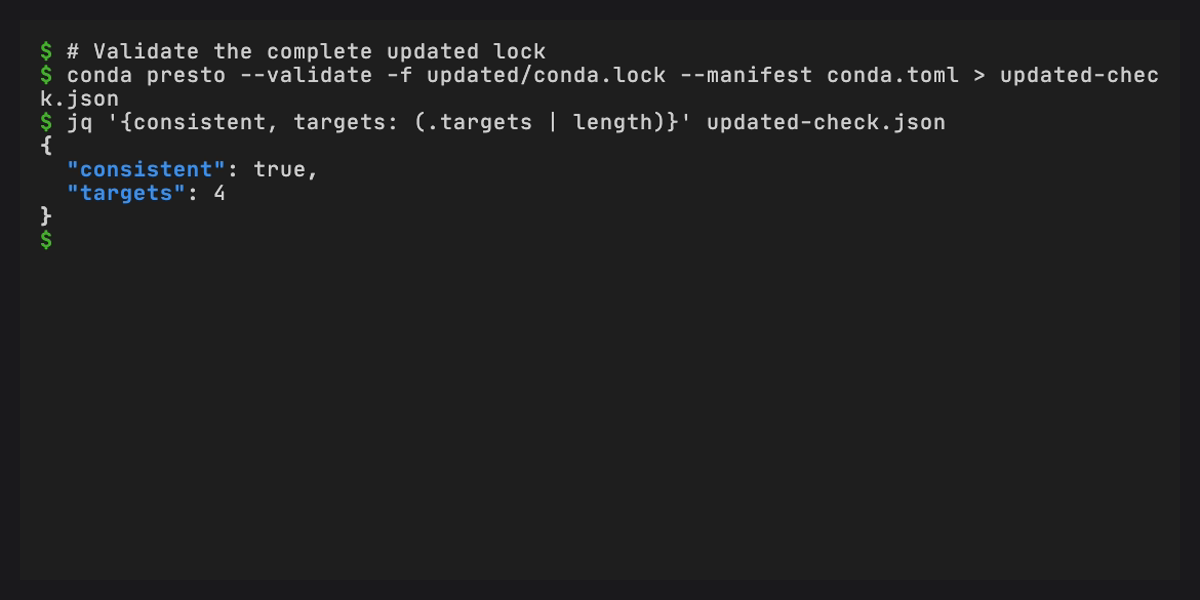
conda presto --validate -f updated/conda.lock --manifest conda.toml
Expect another consistent report covering all four targets. Review and adopt the returned lock when you are ready. Presto leaves adoption to the caller.
Record the workflows#
The VHS tapes contain the recorded commands and their checks. From a new terminal in the repository, run:
pixi run --locked -e demos demos cli workspace locks
Shared setup prepares temporary directories and fixtures. The workspace and saved-lock tapes use the same manifest as this tutorial. See Demos for the six recordings and recording prerequisites.
Continue with Resolve and maintain environments over HTTP to perform these operations through the service, or CLI reference for exact command options and exit statuses.