
conda-skills#
Know conda but new to AI agents? Read Skills for conda users for a one-page overview of the terminology, files, and workflow.
What is a skill?#
A skill is a set of instructions for an AI coding agent. It usually lives in a text file called SKILL.md, sometimes with examples, reference material, or scripts alongside it. A skill might explain how to work with a particular library or carry out a code review.
The open Agent Skills specification defines the format: a directory with SKILL.md, metadata, and instructions.
Your agent reads those instructions to help with a task. Installing a skill package does not change the agent’s model or install the library it describes unless the package declares that dependency.
Conda-skills lets you get skills through conda packages and make them available to your agent. You choose which instructions to use in each project.
Inspired by Pavel Zwerschke’s pixi-skills and skill-forge, this project brings the same approach to conda’s Python stack. See Prior art for the background.
Why use conda-skills?#
Copying a skill into one project is straightforward. Keeping track of where it came from, which version you use, and how to share that setup takes more work.
Conda manages the skill’s package and version. You choose which projects can use it. Several projects can link to the same installed files, and teams can record package versions in a shared environment definition. Updating that package changes the content visible through those links, so review updates before making them available again.
If you already use conda, this keeps skill distribution in your existing tooling. For a single local skill you maintain yourself, copying the files may be enough.
See Common questions for how this compares with copying files, what gets installed, and whether you need conda-workspaces.
Start with one skill#
The Try your first skill tutorial walks through one example: instructions for working with the Polars data library. You will:
Create and activate a new conda environment containing the skill package.
Read its instructions and decide whether to use them.
Make it available to a project, then remove it again.
You need conda and an agent that supports a skill-directory convention. If conda skill --help is not available yet, follow Install conda-skills first. No recipe writing or workspace configuration is needed for the tutorial.
Read a skill before using it. conda skill inspect NAME lists its files and supports terminal previews. conda skill open NAME opens its directory in your file manager. Conda-skills checks the package layout, but you decide whether the instructions are appropriate for your work.
What the commands do#
Command |
What it does |
|---|---|
|
Downloads a package into a conda environment. |
|
Creates a directory link so your agent can find an installed skill. |
The link points to the installed files instead of making another copy. conda skill unlink removes that link and leaves the package alone. Conda-skills does not launch your agent or change its configuration. The tutorial explains how to choose its skill directory.
Watch first, if you prefer#
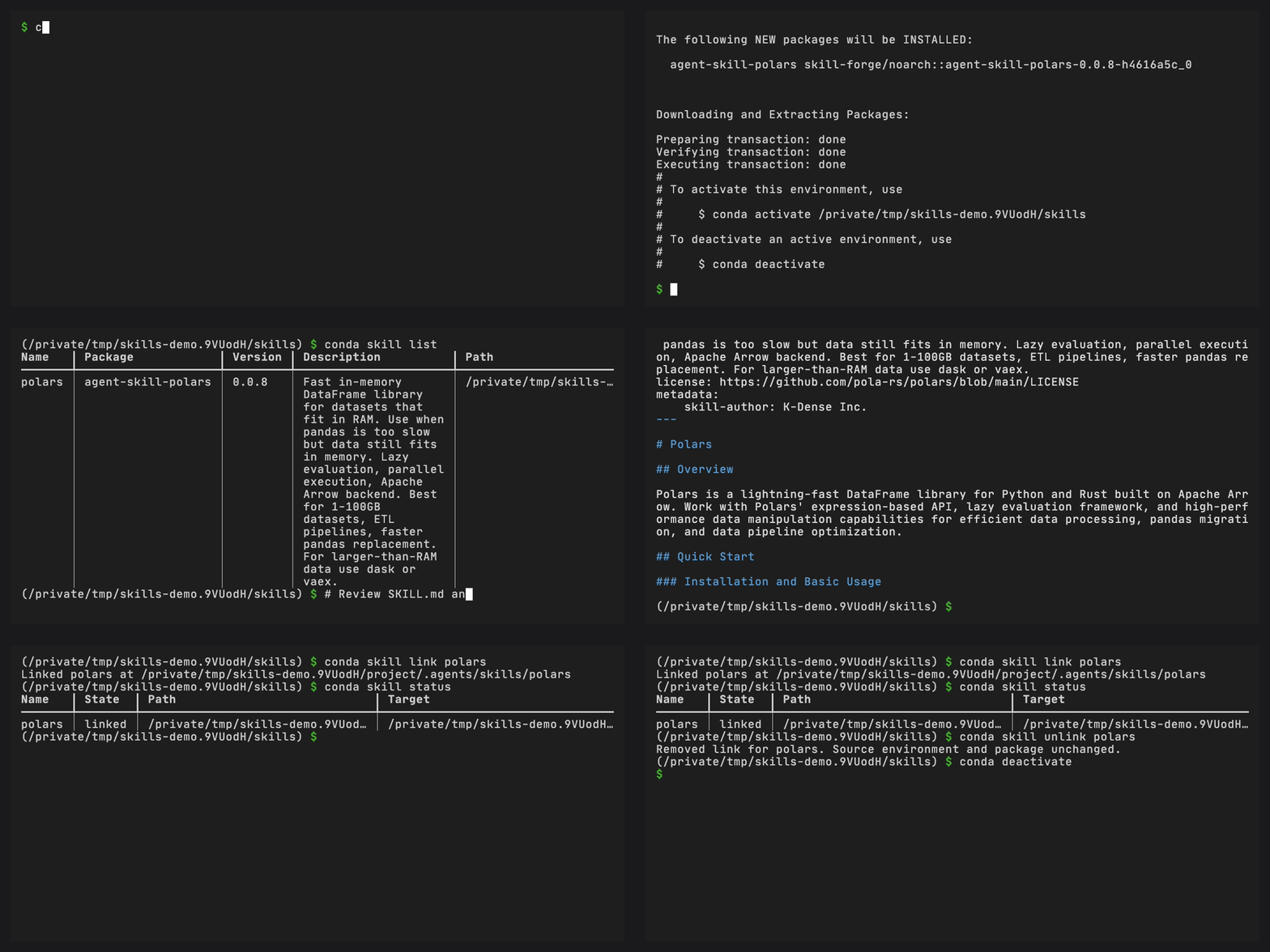
Prefer written instructions? Every recording on the Demos page has a text equivalent.
After the first tutorial#
Create starter files with conda skill init, or use the interactive guide.
Keep package versions in a workspace manifest and lockfile when your project needs them.
For ongoing use, see Update or roll back a skill, Command reference, or Troubleshooting. The explanations cover How agents find skills and Skill safety when you need those details.